Simple-File-Transfer-With-OneMinuteServer

The Simple-File-Transfer Java Application

The Idea

The idea is to use the OneMinuteServer to transfer files from A to B.
There are some special reasons why you use this instead of other solutions.

  • It is easy to use. One Click, and it is working (If the Directory exists.)
  • It´s using normal Http-Ports.
  • The file is nowhrere stored in complete. Just parts for a minute on the OneMinuteServer.## How it works
  • If you select a file to send, the file will be splitted in parts, each 1000 bytes. And send to the server, one by one. With a short delay. Maybe the transfer of the file last a few seconds, or minutes. Depending on the size.

  • If you select Receive, the server is asked every few seconds, if there is a file available. If there is a file, the parts are fetched, one or more parts at a time. If the file is complete, it is written to the desination-directory.

More than one person can receive at a time, and more than one can send.
For example, if you have 10 friends, you can send them all a file at once.
It´s important to have the same clientid, which is like a key on the server.

With this simple version, you should not send and receive at the same time.
Next project will have more possibilities.

Overview

Overview

Source-Code

Find it on github: https://github.com/hbreinecke/simple-file-transfer

like-web-analytics

See how it works

Now we are going to see how live data can be requested from the one-minute-server and analyzed.

Get this thing started

like-web-analytics
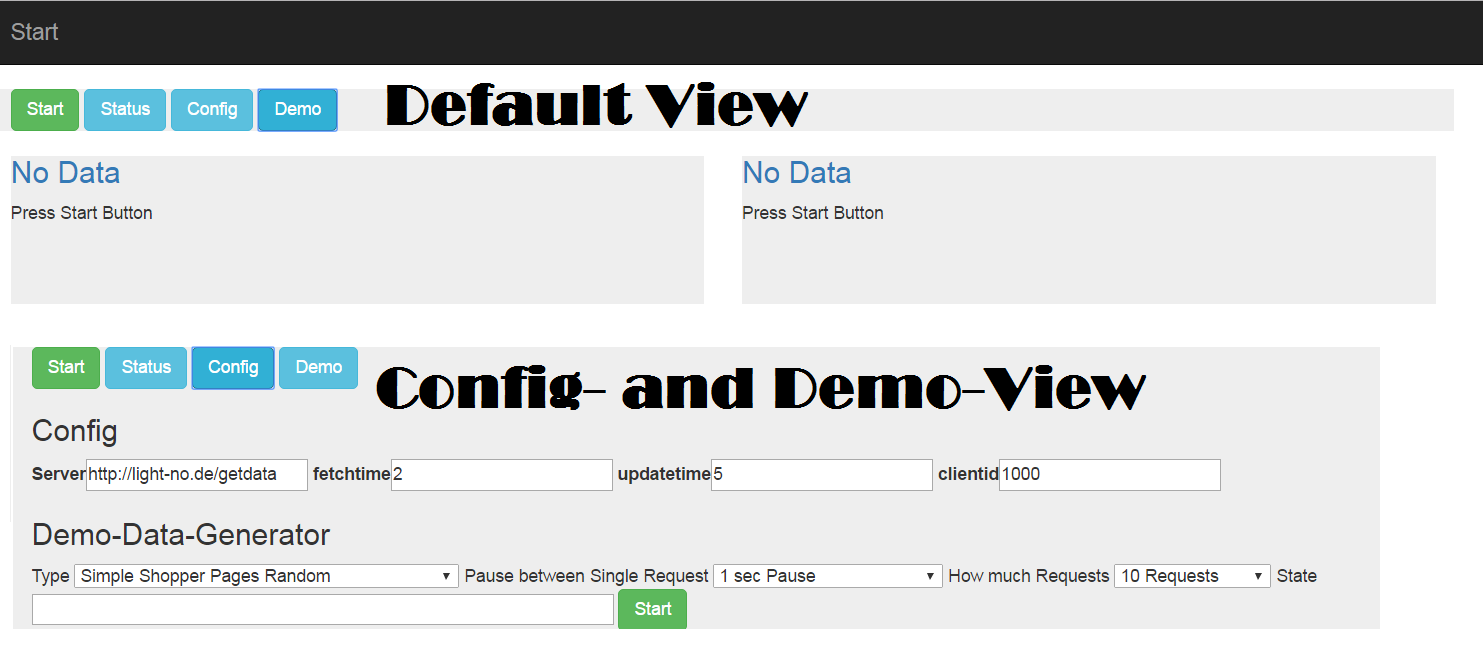
Here you see the default view with no data available.
To request data from the server you have to push the start-button. Press it now.
It makes sense to have differnt times, because request time should not be over 60 seconds, but display time you can have 2 minutes, if its ok for your application.
In the config-view you can set the sever (here my demo-appliance) and how often the data should be requested and the data sould be updated in the view.
In the demo-panel you can choose different things

  • There are differnt labels a user can go to in this demo-shop

    1
    2
    3
    4
    5
    6
    7
    var labels = [
    {"category" : "Startseite", "content" : "Start", "campaign" : "Google1"},
    {"category" : "Startseite/Auto & Motorrad/KFZ-Ersatzteile/Scheibenreinigung/Scheibenwischer", "content" : "Überblick" },
    {"category" : "Startseite/Auto & Motorrad/KFZ-Ersatzteile", "content" : "Kategorie Überblick" },
    {"category" : "Startseite/Elektronik & Computer/Unterhaltungselektronik/Foto & Video","content" : "Kategorie Überblick" },
    {"category" : "Startseite/Elektronik & Computer/Unterhaltungselektronik/TV, Audio & Video/Fernseher & ZubehörFernseher", "content" : "Telefunken Full HD LED TV 102cm"},
    ....
  • Type of shopper :
    … a person visiting random pages from the list
    … a person visiting the pages in the the natural order
    … 10 persons visiting random pages
    … 100 persons visiting random pages

  • Pause between request 1/8 second, 1/4 second,.. till random 5-20 Seconds

  • How much requests are send (5,10,..10000 )

  • and a request down-counter

You have got to press start to send requests. Press it now.

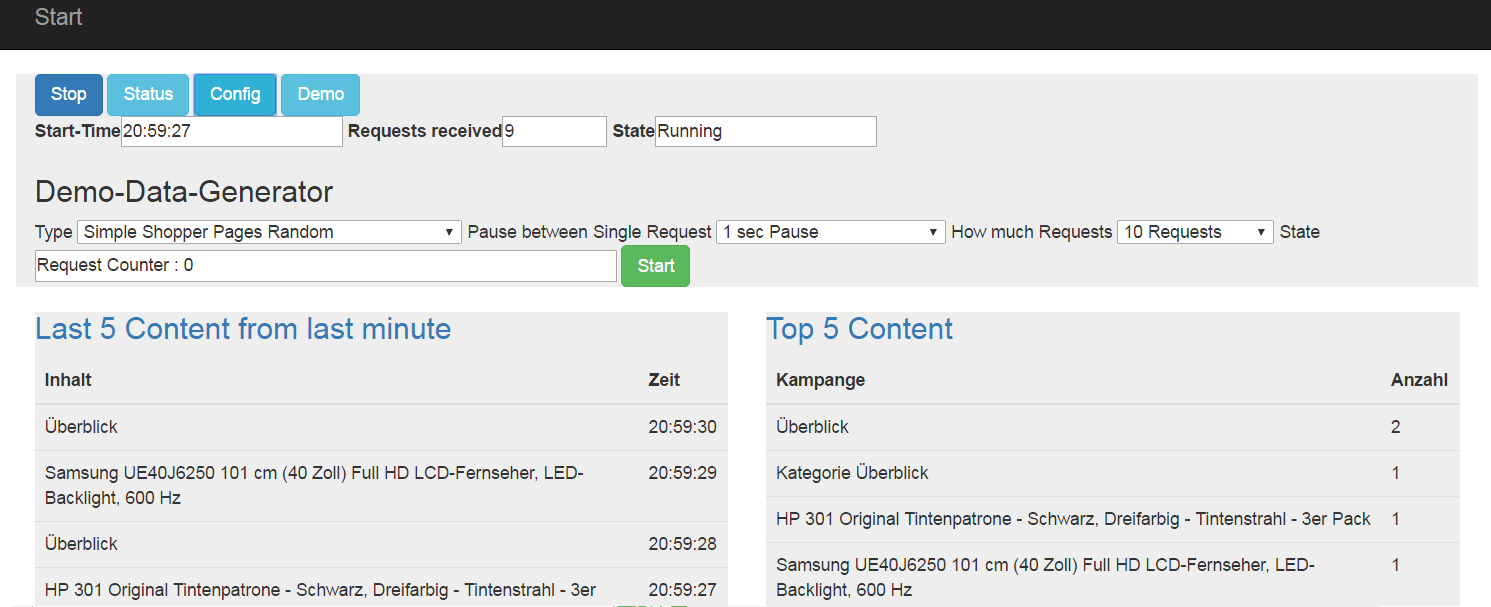
A few moments later, denpending on your settings, you see this:
like-web-analytics 2

It you let this run for a while, you will see the requests disapear from the last minute.
On the right side you see the top 5 content requests since the app loaded. They will not dissapear after a minute. They stay till you close the browser, or hit F5.

The Code in analytics.js

After hitting the start-button, the function “start” is called

1
2
3
4
5
6
7
8
9
10
11
function start(){
dataworld.timer1 = window.setInterval(fetchData, document.getElementById("fetchtime").value *1000);
dataworld.timer2 = window.setInterval(displayData, document.getElementById("updatetime").value *1000);
dataworld.serverurl = document.getElementById("server").value;
dataworld.clientid = document.getElementById("clientid").value;
dataworld.lastfetchtime=0;
dataworld.databaseexist=false;
dataworld.numericfields=["day","month","year","hour","minute","second","timestamp","deletetime"];
dataworld.currentpage=1;
dataworld.databasecolumns=[];
...

Which sets a fetch-timer and a display-timer
The function fetchData gets data from the server and call processData()

1
2
3
4
5
6
7
8
9
10
11
12
13
14
15
16
17
function fetchData(){
var dparam = {};
dparam.clientid= dataworld.clientid;
dparam.lastfetchtime = dataworld.lastfetchtime;
dparam.clienttime = new Date().getTime();
$.ajax({
type: "GET",
crossDomain: true,
url: dataworld.serverurl + "?l="+ b64EncodeUnicode(JSON.stringify(dparam)),
dataType: "text",
success: function(data) {
if(data.length > 0){
statusmessage("Recieved Chars " + data.length);
processData(data);
}
...

In this function the data are splitted into lines and parsed. Neccessary values like time-values are added.
If there are new columns, they are added to the database. Database will be created if it doesnt exist.
The column names are dynamic and must be the same on the sending client and the sql here.

1
2
3
4
5
6
7
8
9
10
11
12
13
14
15
16
17
18
19
20
21
22
23
24
25
26
27
28
29
30
31
32
33
34
35
36
37
38
39
40
41
42
43
44
45
46
47
48
49
50
function processData(data){
//console.log(data)
datalines=[]
datalines = data.split("|||");
if(datalines.length==0){return}
dataworld.currentlines+=datalines.length;
$("#reqreceived").val( dataworld.currentlines);
//statusmessage("Recieved lines: " +datalines.length);
for(lc in datalines){
if(datalines[lc].length==0){break;}
//console.log(datalines[lc]);
var parseddata = JSON.parse(datalines[lc]);
var datum = new Date(parseddata.trackingtime);
parseddata.year = datum.getFullYear();
parseddata.month= datum.getMonth();
parseddata.day = datum.getUTCDate();
parseddata.hour= datum.getHours();
parseddata.minute= datum.getMinutes();
parseddata.second = datum.getSeconds();
parseddata.datum = twoDigits(parseddata.hour) + ":" + twoDigits(parseddata.minute) + ":" + twoDigits(parseddata.second );
if(dataworld.databaseexist== false){
createDatabase(parseddata);
dataworld.databaseexist= true;
}
if(parseddata.timestamp > dataworld.lastfetchtime){
dataworld.lastfetchtime = parseddata.timestamp;
}
var inssql = "insert into rawdata (" ;
var colstring="";
checkDatabaseColumns(parseddata);
for(ind in parseddata){
var k = colstring.length=="" ? "" : ",";
colstring+= k+" " + ind;
}
inssql += colstring + ") values (";
colstring="";
for(ind in parseddata){
var k = colstring.length=="" ? "" : ",";
if(dataworld.numericfields.includes(ind)){
colstring+= k +" " + parseddata[ind]+"";
}else{
colstring+= k+ "'" + parseddata[ind]+"'" ;
}
}
inssql+=colstring + ")";
alasql.exec(inssql);
}
}


Display results

I choosed a simple design (6 displays per page, 2 in a line. id of every element: 1 to 6)
For every analyze you have got a sql, a display type and some html/css-properties
Get all entries for the current page; execute the sql, put the values in a converter, display it on the right id, ready !

1
2
3
4
5
6
7
8
9
10
11
12
13
14
15
16
17
18
19
20
21
22
23
24
25
26
27
28
29
30
31
32
33
34
35
36
37
38
39
40
41
42
43
44
45
46
47
48
49
50
51
52
53
54
55
56
57
58
59
60
61
62
function displayData(){
//console.log("display");
var analyseLayout=[
{ "title" : "Last 5 Content from last minute",
"page" : 1,
"into" :"1",
"sql" : "Select top 5 content, datum from rawdata where trackingtime > "+ (new Date().getTime()-60000) + " order by 2 desc",
"display" : "simpletable",
"heading" : ['Inhalt','Zeit'],
"dclass" : ".col-md-4"
},
{ "title" : "Top 5 Content ",
"page" : 1,
"into" : "2",
"sql" : "Select top 5 content, count(*) from rawdata group by content order by 2 desc",
"display" : "simpletable",
"heading" : ['Kampange','Anzahl'],
"dclass" : ".col-md-4"
},
{ "title" : "Anzahl User",
"page" : 1,
"into" : "3",
"sql" : "select count(*) from (Select distinct user from rawdata )",
"display" : "simpletable",
"heading" : ['Benutzer'],
"dclass" : ".col-md-4"
}
];
for(var n = 1;n <= 6; n++ ) {
$("#loc"+ n ).html("<h3><a href='#'></a></h3>");
}
for(index in analyseLayout){
var ana = analyseLayout[index];
if(ana.page==dataworld.currentpage){
var localresult="<h3><a href='#'>" +ana.title+ "</a></h3>";
var datas =[];
try {
datas = alasql.exec(ana.sql);
localresult+= converters[ana.display](datas,ana.heading);
$("#loc"+ ana.into ).html(localresult);
} catch(e){
console.log(e);
}
}
}
}
var converters=[];
converters["simpletable"]=function(data,head){
var ret = "<table class='table '> <thead><tr>";
for(var ix in head){ret+="<th scope='row'>"+head[ix] + "</th>"}
ret+=" </tr></thead>"
for(var index in data){
ret += "<tr>";
for(var na in data[index]){
ret += "<td>" + data[index][na] + "</td>"
}
ret += "</tr>";
}
return ret+"</table>";
}

The converter just puts the values into a html-table and returns the result string.See it all at : http://light-no.de/apps/like-web-analyze

See it all at :
See it in live action

Web-Transfer-Javascript

Transfer data from web-pages

How to use the library

Include the library and send data:

1
2
3
4
<script src="js/transfer.js"></script>`
var lightclientid=999; // your individual id on your server
var jData={'label':'/MyShop/Start/SomeCategory'};
lightspeed.track(jData);

Which values to use : ‘label,name,content,site,pageid,….’ ?
You are free to choose whatever you want, except of ‘clientid’, ‘user’ and ‘trackingtime’. They are used internaly.The data you send to the server are returned to the other client and can be processed there.

The library

1
2
3
4
5
6
7
8
9
10
11
12
13
14
15
16
17
18
19
20
21
22
23
24
25
26
27
28
29
30
31
32
33
34
35
36
37
38
39
40
41
42
43
44
45
46
47
48
49
50
51
52
53
54
55
56
57
58
59
60
61
62
63
64
65
66
67
68
69
70
71
72
73
74
75
76
77
78
79
80
81
82
83
84
85
86
87
88
89
90
91
92
93
94
95
96
97
98
99
100
101
102
103
104
105
106
107
108
109
110
111
112
113
114
115
116
117
118
119
120
121
122
123
124
125
126
var lightspeed = (function (win, doc) {
//****************************************************************************
// start internal functions
if(getCookie("lightuser")==""){
setCookie("lightuser", generateUUID(),1000 )
}
var lightuser = window.lightuser ? window.lightuser : getCookie("lightuser");
var clientid = window.lightclientid ? window.lightclientid : "0" ;
var contentObject ={};
//****************************************************************************
function addimage() {
lightuser = window.lightuser ? window.lightuser : getCookie("lightuser");
var img = document.createElement("img");
img.id="pic4711";
//img.src = getPicServer() +"/" + clientid + "/" + lightuser + "/" + getImageName() +".jpg" + getImageParam();
//img.src = getPicServer() +"/" + clientid + "/" + lightuser + "/0.png" + getImageParam();
img.src = getPicServer() + "/0.png" + getImageParam();
img.height = 0;
img.width = 0;
img.style.top=0;
img.style.right=0;
img.onload = loadHandler;
document.body.appendChild(img);
}
//****************************************************************************
function getPicServer(){
return "http://light-no.de/img";
}
//****************************************************************************
function getImageParam(){
if(!isEmpty(contentObject )){
contentObject.clientid = window.lightclientid ? window.lightclientid : "0" ;;
contentObject.user = lightuser;
contentObject.trackingtime = new Date().getTime();
var va = JSON.stringify(contentObject);
//console.log(contentObject);
va = b64EncodeUnicode(va);
contentObject={};
return "?l=" + va + "&t=" + rand(1,50000);
} else{
return "";
}
}
//****************************************************************************
function rand (min, max) {
return Math.floor(Math.random() * (max - min + 1)) + min;
}
//****************************************************************************
//****************************************************************************
function isEmpty(obj) {
for (var x in obj) { return false; }
return true;
}
//***************************************************************************
function loadHandler(){
//console.log("image loaded");
}
//****************************************************************************
function getURLParameter(name) {
return decodeURIComponent((new RegExp('[?|&]' + name + '=' + '([^&;]+?)(&|#|;|$)').exec(location.search) || [null, ''])[1].replace(/\+/g, '%20')) || null;
}
//***************************************************************************
function b64EncodeUnicode(str) {
return btoa(encodeURIComponent(str).replace(/%([0-9A-F]{2})/g, function(match, p1) {
return String.fromCharCode('0x' + p1);
}));
}
//b64EncodeUnicode('? à la mode'); // "4pyTIMOgIGxhIG1vZGU="
//b64EncodeUnicode('\n'); // "Cg=="
//***************************************************************************
function b64DecodeUnicode(str) {
return decodeURIComponent(Array.prototype.map.call(atob(str), function(c) {
return '%' + ('00' + c.charCodeAt(0).toString(16)).slice(-2);
}).join(''));
}
//***************************************************************************
function getCookie(cname) {
var name = cname + "=";
var decodedCookie = decodeURIComponent(document.cookie);
var ca = decodedCookie.split(';');
for(var i = 0; i <ca.length; i++) {
var c = ca[i];
while (c.charAt(0) == ' ') {
c = c.substring(1);
}
if (c.indexOf(name) == 0) {
return c.substring(name.length, c.length);
}
}
return "";
}
//***************************************************************************
function setCookie(cname, cvalue, exdays) {
var d = new Date();
d.setTime(d.getTime() + (exdays*24*60*60*1000));
var expires = "expires="+ d.toUTCString();
document.cookie = cname + "=" + cvalue + ";" + expires + ";path=/";
}
//***************************************************************************
//http://stackoverflow.com/questions/105034/create-guid-uuid-in-javascript
function generateUUID(){
var d = new Date().getTime();
if(window.performance && typeof window.performance.now === "function"){
d += performance.now(); //use high-precision timer if available
}
var uuid = 'xxxxxxxx-xxxx-4xxx-yxxx-xxxxxxxxxxxx'.replace(/[xy]/g, function(c) {
var r = (d + Math.random()*16)%16 | 0;
d = Math.floor(d/16);
return (c=='x' ? r : (r&0x3|0x8)).toString(16);
});
return uuid;
}
// end internal function
//***************************************************************************
//***************************************************************************
// return the public methods
return {
generateUUID :function(){ return generateUUID();},
track : function ( param) {
contentObject = param;
addimage();
}
};
//***************************************************************************
//***************************************************************************
})(window, document);

Nothing really hard to get. Anyway, let´s have a look at some parts.
The track-function takes a Json-object and calls addimage(); which transforms the value to Base64 and append it as an image to the document.

Before this happens, as visitor-cookie is set to random value. Maybe helpfull to get well-defined users. As a lot of apps can run on one server, it is neccesary to set a clientid. If you request data from the server, you have got to use the same clientid.
The created-image-link will be something like:
http://light-no.de/img/0.png?l=eyJjYXRlZ29yeSI6IlN0YXJ0c2VpdGUvQXV0byAmIE1vdG9ycmFkL0tGWi1FcnNhdHp0ZWlsZS9TY2hlaWJlbnJlaW5pZ3VuZy9TY2hlaWJlbndpc2NoZXIiLCJjb250ZW50Ijoiw5xiZXJibGljayIsImNsaWVudGlkIjoxMDAwLCJ1c2VyIjoiNTEyOTZlYTMtYzk3My00ZTBiLWFkMjItZGEwMDU2YmVlMzU5IiwidHJhY2tpbmd0aW1lIjoxNDkwMDI5MjE5Mzc0fQ==&t=18162

The l-Param contains the data, the t-param is a random number, to avoid caching.

Server Part1

Welcome to The One Minute Server

The Idea

The idea is to build something with node.js.
I decided to stored objects, just for one minute. What can you do with such a server ?
Let´s discover it.

ArchitectureOverview

Overview

Setup

You need a node-server running. And you can send Get-requests to the
server with objects in the url. e.g. : http://www.server.com/img/l=Base64Coded-Entity.
And you can get available data from the server: http://www.server.com/getdata

Server

1
2
3
4
5
6
7
8
9
10
11
12
13
// most important parts
var app = express();
app.locals.datastore = new Array();
app.set('views', path.join(__dirname, 'views'));
app.set('view engine', 'jade');
app.use(bodyParser.json());
app.use(bodyParser.urlencoded({ extended: false }));
app.use(cookieParser());
app.use(express.static(path.join(__dirname, 'public')));
app.use(express.static(path.join(__dirname, 'applications')));
app.use('/', index);
app.use('/img', img);
app.use('/getdata', getdata);

Why “img” as path ? Because the first example dependes on
web-tracking, and it is so that you request a pixel from the server with
your tracking-request for most tracking solutions. So i went the same way.

The Img.js

1
2
3
4
5
6
7
8
9
10
11
12
13
14
15
16
17
18
19
20
21
22
23
24
25
26
27
28
29
30
31
32
33
34
35
36
37
38
39
40
41
42
43
44
45
var express = require('express');
var router = express.Router();
const fs = require('fs');
var url = require('url');
var image = fs.readFileSync('/var/www/html/1px.png');
//******************************************************************************
router.get('/*', function(req, res, next) {
var datum = new Date();
var currentTime = datum.getTime() ;
var deleteTime = currentTime - 60000;
var o = parseUrl(req.url, currentTime ); // get Information from Url to Json
storeLocal(o,req); // store data in local array
cleanUp(deleteTime,req); // delete old data
res.end(image, 'binary');
});
//******************************************************************************
function parseUrl( requrl, currentTime ){
var url_parts = url.parse(requrl, true);
var query = url_parts.query;
var b = new Buffer(""+query.l, 'base64');
var o = JSON.parse( b.toString());
o.timestamp = currentTime;
o.pkey = ""+currentTime+"_"+o.clientid;
return o;
}
//******************************************************************************
function cleanUp(cleanupTime, req){
var temp = [];
var foundAt =-1;
for( index in req.app.locals.datastore){
var objtime = req.app.locals.datastore[index].timestamp;
if(objtime < cleanupTime){
foundAt = index;
}
}
if(foundAt > -1){
req.app.locals.datastore = req.app.locals.datastore.slice(foundAt);
}
}
//******************************************************************************
function storeLocal(obj,req){
req.app.locals.datastore.push(obj);
}
//******************************************************************************

I build a small data-transfer-library which you can integrate in any website to send some values. The lib has one function which is “track(JSON-Object)”. More about this in the next posts.